
Client-side performance: make your end users stay

Do you have strong confidence in successful customer experience (CX) on your website? If you’re not sure of the answer, this article can be helpful for you.
In most cases, when people hear about performance testing, they think about server-side optimization. Let’s imagine your server is fully tested for performance, all back-end bottlenecks are fixed, and the system can handle the desired load.
At the same time, when the user navigates through your website, he or she doesn’t care about the possible server load and the response time. The only thing users care about in terms of performance is how fast they can book tickets, read an article, or put some long-awaited goods into a basket.
Even with flawlessly configured and optimized application server, client-side is the key to improved CX. The best way to find this key is to perform client-side testing.
Based on the CX performance testing results, you can optimize the layout of the pages and speed up the application full load time in GUI.
Let’s see through real-world examples of how client-side performance can strongly affect CX.
Client-side testing essentials
Almost everyone has once faced the need to find flight tickets. With popular destinations, it is a common thing when several airlines are flying to the same place. With a large choice of carriers, the final decision made by a user is based not only on the best price/time combination but also on the speed and smoothness of the website. Page load time and time until UI is interactive are crucial for positive CX.
According to Google research (www.thinkwithgoogle.com), if page load time takes 1–3 seconds, the probability of bounce (when a user leaves the first page without further interaction) increases by 32%, whilst page load time of 10 s increases the bounce probability by 123%.
To test from user perspective, one should think like a user and behave like a user. Customers don’t care about the response time from the server, they just want the page to load faster.
Even if an application handles thousands of concurrent users and gets responses from the server less than in a second, it doesn’t mean the page will return results to the users fast too.
Not to be unfounded, we conducted the client-side testing of the 5 biggest European airlines and compared performance from the end-user perspective, measured the basic performance metrics, and identified the application’s bottlenecks. We tested the main functionality of the official airlines’ websites: main page, user profile, and flight search.
Test environments
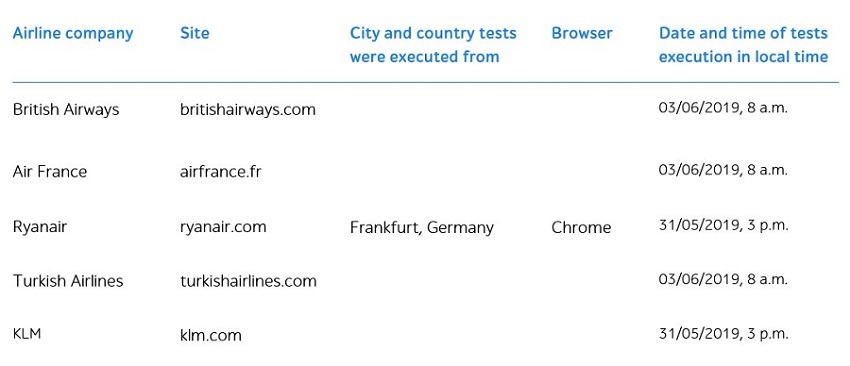
First Meaningful Paint is a point when the primary page content is visible. Basic metrics you need to consider include:
- Speed Index is the average time at which the page displays its visible parts.
- Time to interactive is metric determining interactivity of the page by the network and JS activity.
Test results
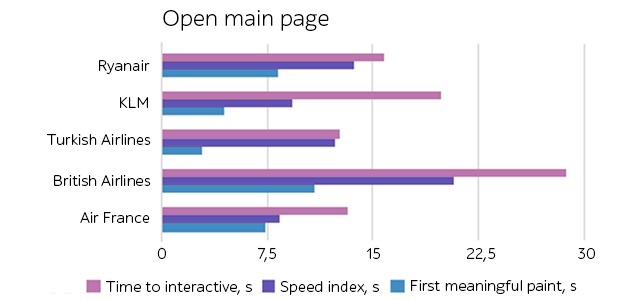
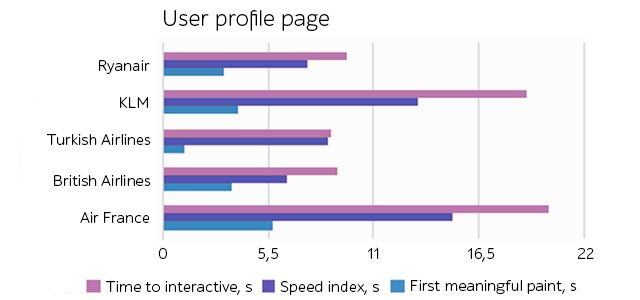
We gathered the metrics using Lighthouse tool. The graphs for more visual information with values are presented below:
Main page
User profile page
Search flights page
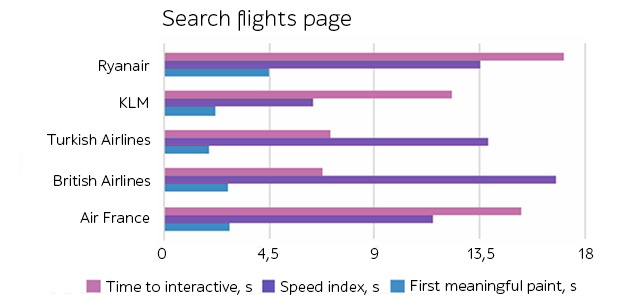
Looking at the test results and evaluations obtained with the Lighthouse tool, applications rating is the following:
- https://www.turkishairlines.com/
- https://www.britishairways.com/
- https://www.klm.com/
- https://www.ryanair.com/
- https://www.airfrance.fr/.
However, even the leader in this comparison – Turkish airlines website – takes more than 5 seconds to become fully interactive. Others – even worse. 20 seconds until the page is fully accessible for the user – this is something one cannot afford in the competitive web applications market.
How to enhance client-side performance
If you run your website through Lighthouse tool and see the page load metrics, this is half the battle. What’s left is how to decrease page load time. Let’s go through the most common client-side performance issues.
Common client-side performance pitfalls are:
- Unused CSS
- Blocking resources rendering
- Images compression and format.
Another bottleneck is JavaScript (JS) execution time. To reduce this parameter, one can consider the following steps:
- JS code minification
- JS code compression
- Unused JS code removing
- JS code caching.
Whenever the project gets rid of all unused resources, compresses images, JS code, and properly orders the resources to load, the page load can decrease a lot making end-user satisfied and encouraged to continue the journey on the website.
However, client-side testing is not a performance magic wand.
Server response time still matters: if the webpage is ready to render fast but doesn’t get any response, CX is affected strongly.
If you face slow server response time, here are possible solutions:
- The server application logic optimization. If you use a server framework, it can have recommendations on how to do it right.
- Database queries optimization. Together with queries optimization, consider migrating to a faster database.
- The server hardware upgrade to have more memory and CPU.
Afterword
Client-side testing is key to smooth CX. With the increasing amount of elements on the pages as well as a high amount of competitors in the market, it is vital to ensure the website is loading and becomes interactive fast. Client-side testing has its advantages:
- Can be automated or just used to test the most significant pages
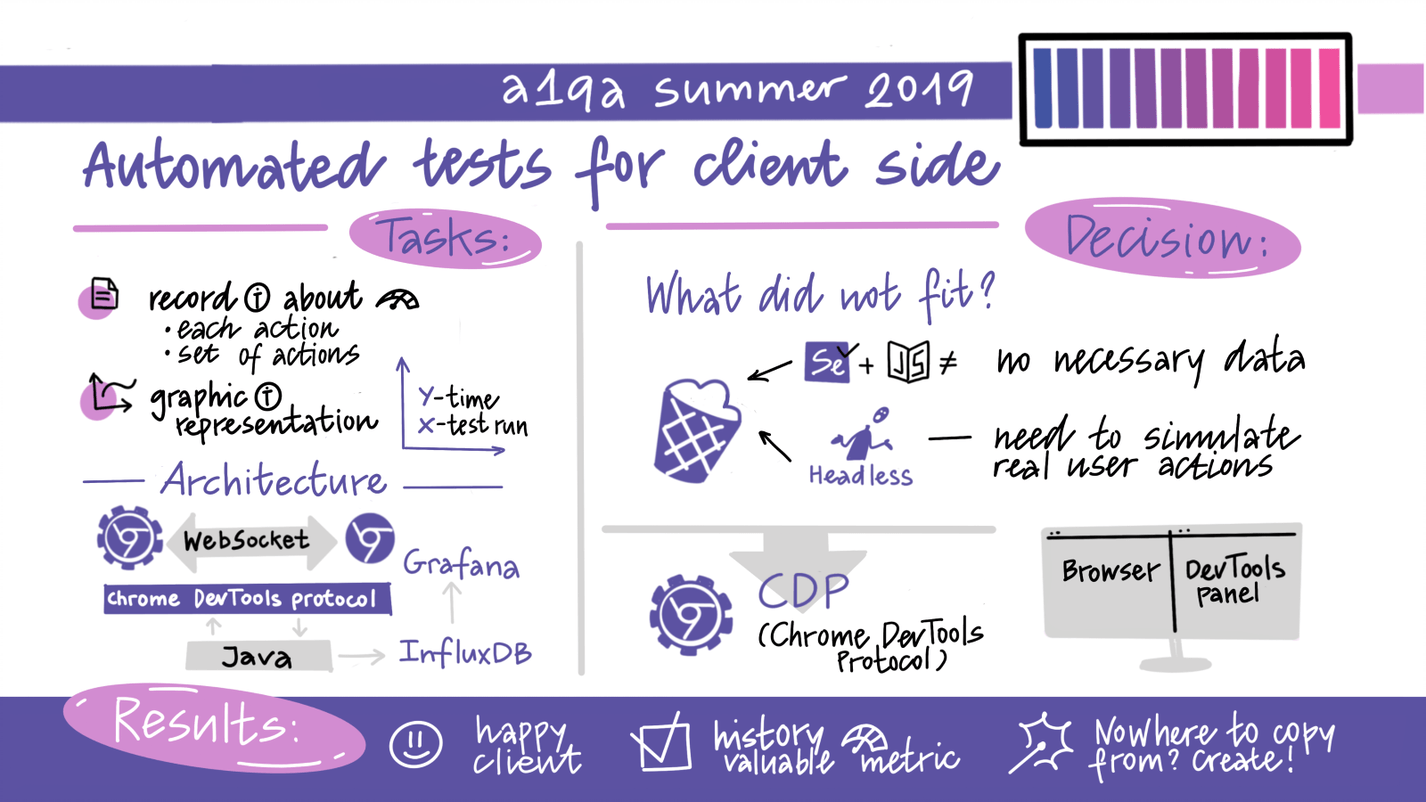
Have a look at the summarized report that was submitted by the QA professional at the traditional a1qa summer conference. It highlights how applied test automation best practices helped fast-track the quality assurance process at the real-life project.
- Doesn’t require a separate testing environment
- Can be conducted under/without load
- Doesn’t take a lot of time
- It doesn’t require special skills and doesn’t consume a lot of resources.
However, client-side testing is not something that will resolve all your performance issues. It identifies front-end performance bottlenecks but works the best way when combined with server-side performance testing.
Book a free consultation with the a1qa professionals to see how we can boost the performance of your software product.