

Desktop application testing services
What we solve with desktop application testing
Security risks
Faulty installation
OS and hardware compatibility issues
Redundant system and third-party background processes
Unauthorized user access
Lack of default values
Implicit error messages
Functional defects
Intrusive modal windows, and more
Our desktop application testing services

Functionality
We provide automated and manual desktop application testing to confirm that client-side and server-side components meet all the requirements.

Performance
a1qa’s software testing and quality assurance services oversee how different desktop applications perform in expected and unexpected conditions by testing their stability, scalability, and speed under varying loads.

Usability
We make sure your app provides user-friendly experiences and has intuitive interfaces.

Compatibility
We run desktop application testing on Windows, Mac, and Linux to ensure faultless performance on any intended operating system. We can also review the solution’s interactions with mobile platforms when relevant to ensure seamless UX across devices.

Security
We will run security checks of your app to spot possible vulnerabilities as well as verify its compliance with major security standards and policies, such as those issued by ISO and IEC.

Testing automation
a1qa automates desktop app testing to save time, cut down on your software delivery costs, and enhance the app’s performance with nothing overlooked.



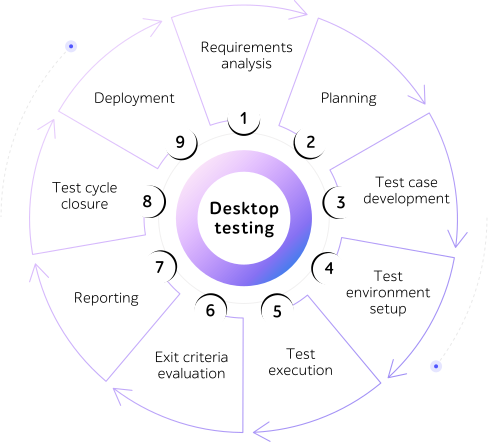
We guide through desktop testing, step by step
We analyze your technical specifications and requirements.
We outline the roadmap in line with the methodology and available resources.
We design test cases and/or automation scripts.
We configure software and hardware for the test environment setup.
We test according to the collected data and reiterate if necessary.
We check how the testing meets the cycle completion criteria.
We share quantitative and qualitative reports.
We evaluate detected issues and update the roadmap for further cycles.
We check for operational readiness, deploy, and validate post-deployment performance.

Our desktop test stack










What do you get with a1qa?

A pool of 1,100+ committed QA engineers

‘Mix-and-match’ of best testing methodologies

10 in-house R&Ds and Centers of Excellence

Complete transparency of all testing processes

End-to-end traceability of project KPIs

Highest levels of responsiveness and flexibility

Tried-and-true testing tools in use

11+ business domains served
Frequently asked questions
Desktop app testing providers typically offer functional testing to check whether the app functions correctly, performance testing to assess how it handles various loads, usability testing to verify its user-friendliness, compatibility testing across different operating systems and hardware, and security testing to uncover any vulnerabilities. Automated testing can also be used to increase QA activities’ coverage and efficiency.
By automating desktop app testing, companies can reduce software delivery costs by speeding up test cycles, decreasing manual efforts, and improving team performance. QA automation also helps expand testing coverage and detect issues early, which lowers the risk of expensive fixes later in the release process.
Testing desktop apps helps identify and eliminate issues like security risks, faults, incompatibilities, and bugs that affect functionality. By ensuring the application works properly across intended environments, companies ensure better app performance, user satisfaction, and business continuity.
We check them on a spectrum of hardware devices with different CPU types, memory sizes, storage setups, graphics cards, etc. that represent your user base. We perform these tests in regulated environments using physical devices and virtualized systems to recreate different specifications.
Yes. Our team tests deployment, configurations, and compatibility with required frameworks, libraries, and external plug-ins, reviewing how software functions with diverse dependency builds, spotting conflicts, and verifying error handling.
We verify software life cycle across diverse platforms and system conditions. During installation, we check that software loads correctly in varied situations and that every component operates as intended. For uninstallation, we confirm that the product is deleted without leaving any footprints. During updates, we ensure patches work without breaking UI, configurations, or user files.
For offline tools, we prioritize local features, speed, file management, and robustness in the absence of a network. For online tools, we audit connectivity, API calls, record syncing, and performance across different network conditions (e.g., sluggish connections).
Our engineers purposefully limit processor power, RAM, and storage, run software to measure its speed and robustness, and track how it handles slowdowns or potential failures.
We can audit the connection, driver alignment, and accurate data transfer between the program and peripheral devices, confirming proper operation of document output, image capture, and other device-specific functions across multiple brands and setups.
We test applications across all major operating systems, including Microsoft Windows, macOS, Linux and on their different versions and configurations to ensure their stable operation.