
Modern Selenium Grid alternatives: Playwright, Cypress, and Selenoid in 2026

Selenium Grid is still active in 2026. Selenium 4 includes WebDriver BiDi support, and version 4.41.0 launched in February 2026. The question is fit.
Back in the late 2010s, Selenoid appealed to teams that wanted to keep Selenium or WebDriver coverage while reducing some of the strain of running Grid at scale. Since then, Playwright and Cypress have changed the market.
They address many of the same browser automation needs through different models. These categories overlap. Selenium Grid and Selenoid are execution platforms for WebDriver-based tests, while Playwright and Cypress are full testing frameworks.
For teams evaluating Selenium Grid alternatives, the cost of a test stack includes maintenance, debugging, onboarding, browser coverage, and CI overhead. Any Playwright vs Selenium or Cypress vs Selenium Grid discussion should start with fit.
This article is a decision guide. It shows when Selenium Grid or Selenoid still makes sense, when Playwright is the stronger option, and when Cypress fits best.
Why Selenium Grid became less attractive for some teams
Selenium Grid did not become obsolete. Selenium 4 made it easier to run than older Grid setups, especially in standalone mode. But once teams move into larger remote browser environments, the operating overhead can still rise quickly. Teams may need to manage nodes, sessions, browser images, routing, and stability of parallel execution across their infrastructure.
That overhead becomes more visible in container-heavy CI/CD pipelines. At that point, the team is maintaining not only tests, but also the browser execution platform behind them.
When failures happen, triage can also take longer because the root cause may sit in the product, session handling, node health, or infrastructure load.
Selenium Grid still works well when an organization creates preparations to support that model. For teams that want less platform overhead, newer frameworks and managed approaches may be a better fit.
Selenoid in 2026: where it still makes sense
Selenoid can still be pragmatic for teams maintaining an existing self-hosted Selenium estate and trying to avoid a full rewrite. It still allows organizations to reuse existing Selenium tests and run browsers in Docker containers on their own infrastructure.
That said, teams should carefully weigh their maintenance status . The official Selenoid GitHub repository was archived on December 17, 2024, and is now read-only. Because of that, Selenoid is not an ideal default choice for new platform investments in 2026.
Its best fit is continuity, not new strategic adoption. If the goal is to preserve an existing Selenium setup for a while longer, Selenoid may still be workable. If the goal is to build new browser automation infrastructure, actively maintained alternatives are the safer recommendation.
Playwright: what changes in practice
Playwright changes the day-to-day experience of building and debugging tests. It removes much of the wait logic that teams used to write by hand. Forming actions and assertions around automatic waiting and retry behavior, which reduces a common source of flakiness in modern web apps.
Browser coverage also helps. Playwright supports Chromium, Firefox, and WebKit through a single API, which giving teams a more direct way to validate behavior across major browser engines. It also includes parallel execution in the framework itself. That means teams do not require a separate hub scale test runs.
Trace Viewer also helps. It gives teams a clear record of what happened during a failed test, which can speed up diagnosis compared to working from logs and screenshots alone.
Playwright also fits mixed engineering teams. It supports TypeScript or JavaScript, Python, Java, and .NET, so it is not limited to front-end developers. That makes adoption easier when QA engineers and developers share ownership of automated checks. Core browser automation features are available across those languages, though the surrounding testing ecosystem and recommended tooling are not identical across languages.
Playwright is often the strongest choice for new end-to-end projects, for teams that want faster onboarding, and for organizations that want broad browser coverage without extra infrastructure. Download numbers change quickly, but Playwright adoption is high enough that most teams evaluating modern browser automation tools will have it near the top of their shortlist.
Cypress: a different niche
Cypress serves a narrower set of needs Its test commands run in the browser context, while plug-ins and tasks run in a separate Node.js context. That model gives developers fast feedback and a clearer view of what the application is doing during a test. That is why many front-end teams like it.
Its component testing support is a major reason teams choose it. Cypress component testing fits well with modern UI workflows , especially when developers own most of the test code and want fast checks at the component level.
Cypress uses JavaScript and TypeScript, making it a perfect fit for teams already fluent in that ecosystem. It supports Chrome-family browsers and Firefox, and it also offers experimental WebKit support. Cross-machine parallelization is most straightforward through Cypress Cloud, which may affect cost and tooling decisions. It also does not target native mobile apps.
Cypress is especially strong when developer experience is a top priority, component testing matters, and front-end engineers mainly write tests.
Which tool fits your team
The right choice depends on three things: the size of your existing Selenium estate, the people who will own the tests, and how much infrastructure your team is willing to operate. This is not a perfect one-to-one comparison, because the tools sit at different layers of the stack.
Teams with a large body of Selenium tests often stay with Grid or Selenoid because rewriting takes time and money. Teams starting fresh often get more value from Playwright, which combines cross-browser support, built-in parallel execution, and strong debugging in one framework. Cypress is often the better fit when front-end developers own the tests and component-level feedback is central to the workflow.
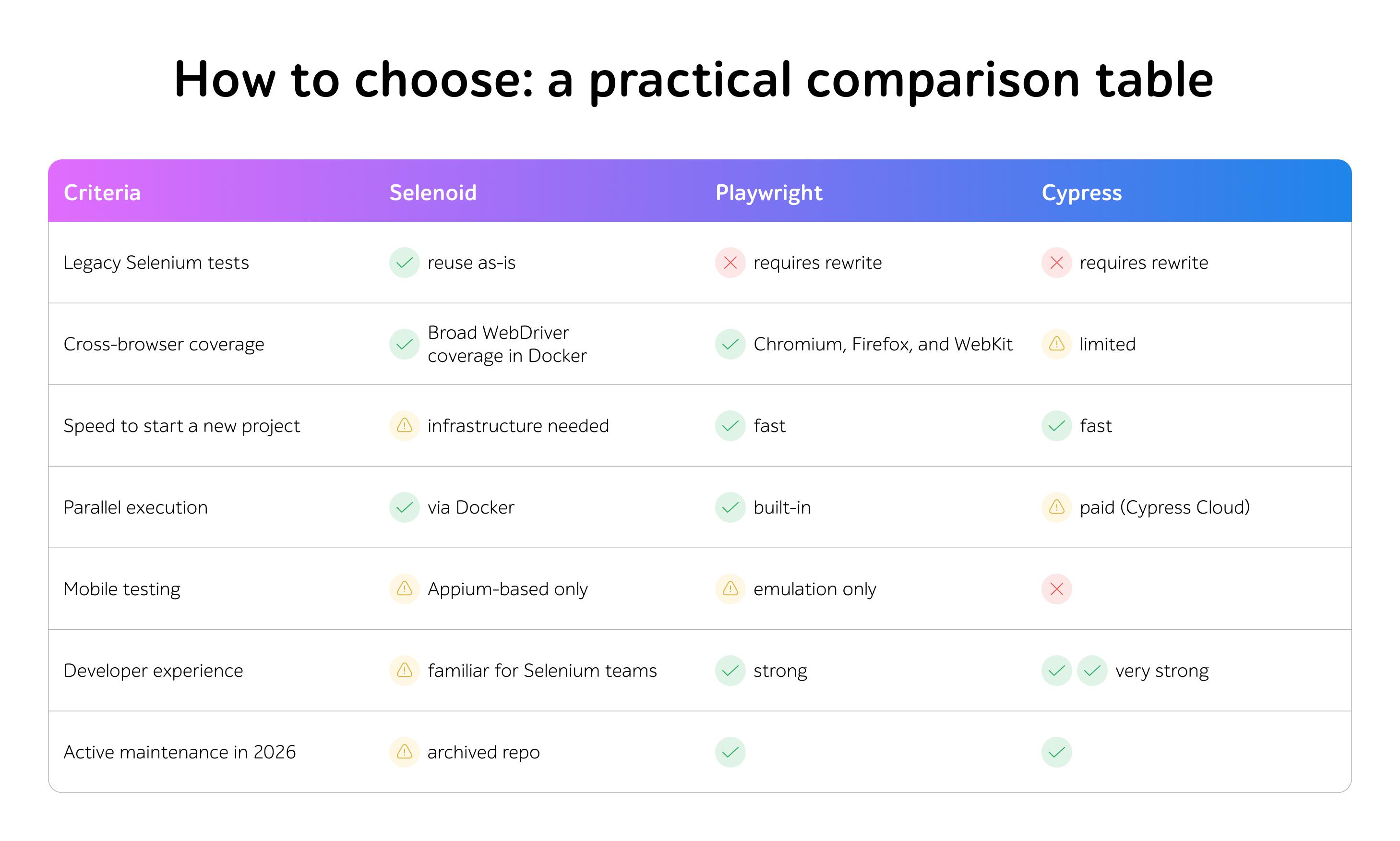
The table below compares the tools in terms of legacy constraints, browser coverage, and operating overhead.
Conclusion
Selenium Grid still has a place in 2026, especially in organizations that already know how to run it well. Most teams choosing a stack today are deciding how much legacy to preserve, how much infrastructure to carry, and how quickly they need dependable feedback.
Not sure which stack fits your project? The a1qa’s test automation team can audit your current test coverage and build a migration roadmap.