Have you ever encountered this: all software acceptance tests are passed successfully, and a release goes live according to a set schedule. However, within weeks, customer support tickets spike, performance degrades under real usage, and project teams have to urgently fix issues, and this delays the next milestones.
If the answer is yes, there’s a chance that the way software quality is evaluated within the organization is incomplete. When quality is assessed narrowly, various inefficiencies or operational risks can be hidden even within a successful launch.
Every quality decision made during development influences how much value software generates, how expensive it becomes to maintain, and how resilient it remains. When viewed through this perspective, quality becomes inseparable from core business metrics, improving ROI, reducing costly post-release rework, decreasing maintenance effort, support overhead, and the accumulation of technical debt across its life cycle.
In this article, let’s analyze why software quality matters for business metrics, examine the ROI of QA investments, review a TCO-driven perspective to quality decisions, and outline actionable insights for C-level leaders focused on maximizing long-term software value.
When software fails, the losses add up fast
You might remember the November 2025 Cloudflare incident, when hundreds of websites across different industries were partially or completely unavailable for hours, disrupting customers and causing major financial and reputational fallout.
While most faults may remain contained and inconsequential, incidents of this magnitude highlight how critical dependable software quality practices are when systems operate at global scale. Even one defect in an IT product can cause the following bumps in the road:
Higher defect costs
Emergency fixes, expensive patches in production environments, customer support escalations, and return expenses are a direct financial burden, distracting teams from innovation, raising stress levels, and multiplying resolution costs and delays.
Customer churn
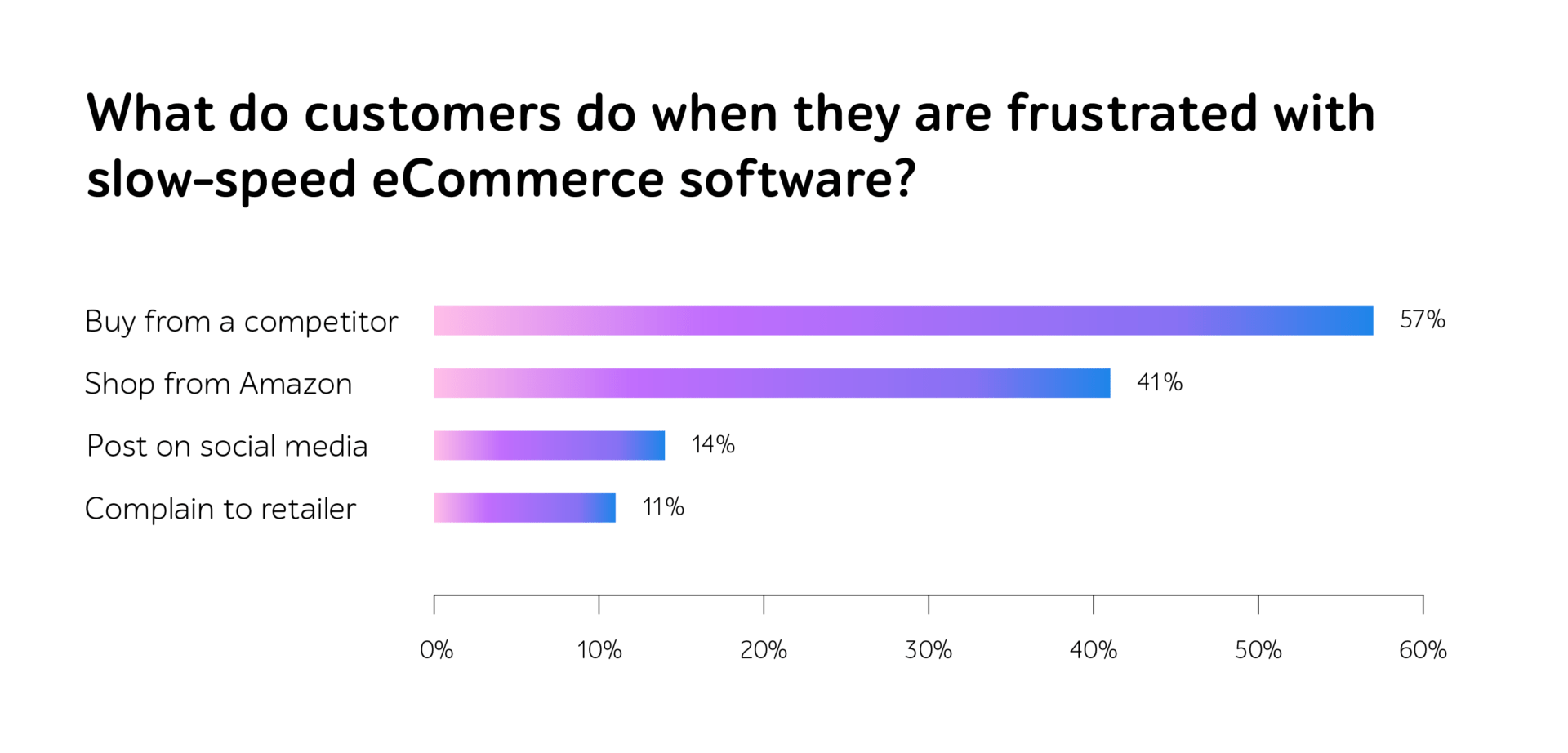
Unfortunately, users will instantly pivot to a rival the moment a service underperforms. Total revenue lost from a departing customer outweighs any minor financial gains achieved by sacrificing quality.
Productivity loss
Technical failures and inefficiencies trap organizations in a cycle of reactive repair, stalling innovation, diverting critical resources to troubleshooting, and crippling output speed. This instability frequently damages employee engagement and triggers staff turnover.
Software excellence serves as a primary pillar for brand reputation and market advantage. Organizations that prioritize high standards foster deep consumer confidence and simplify entry into new sectors. Superior output minimizes churn and optimizes marketing spend, thus boosting profitability and decreasing TCO.
Therefore, to prevent any business risks in the future, it’s important to look at how a smart investment in QA improves ROI and lowers TCO over time.
Key ingredients of effective ROI
ROI can be characterized as a financial thermometer that measures how much profit an investment generates relative to its original cost, showing exactly how hard the money is working for an organization. Within software testing there are three vital aspects that can positively influence the company’s ability to reduce costs, release at a higher pace, and attain superior product reliability.
First of all, test automation. Traditional manual testing can’t keep pace with today’s release velocity. The transition to automation allows companies to strip away redundant workflows, pivoting human talent toward problem-solving and strategic oversight. While manual checks might take days, automated scripts deliver results in moments, slashing human labor involvement by 60-80% (according to IAEME Journal Research) and enabling specialists to probe complex business logic.
Secondly, the infusion of AI in testing. AI identifies potential vulnerabilities, ranks scenarios by risk, and autonomously develops test scripts. This sharpens precision, ensuring expensive glitches never reach end users. Statistical data reveals that AI-powered frameworks can decimate manual workloads, a fact confirmed by 55% of industry stakeholders.
Finally, continuous testing. Uninterrupted quality verification woven into CI/CD workflows radically transforms the financial landscape of software delivery. By scrutinizing code at every individual commit and staging environment, this approach tightens feedback cycles, enabling rapid deployment and the iteration of features with confidence.
When applied together, they can turn into a perfect recipe for shortened cycle times, reduced defect leakage, and robust product quality that drives revenue.
Vital QA aspects lowering long-term costs
To assess the complete financial weight of QA, one must also consider TCO — a comprehensive perspective that tracks every expense across the product’s lifespan. This encompasses not just the initial software acquisition and recruitment, but also infrastructure, ongoing upkeep, and the financial implications of quality decisions.
Standard budgeting often stalls at visible line items like license fees and payroll. However, an authentic TCO evaluation should dive deeper, factoring in the cloud resources, virtual device farms, and CI/CD processing power required for persistent testing. Furthermore, it must include staff upskilling, system integrations, and engineering hours dedicated to refining and repairing test architectures over time.
Therefore, a proactive QA investment can reshape the entire cost-curve of product delivery and drive the following vital advantages:
Reduced support expenditure
By intercepting defects before they reach the production environment, a company can shrink the volume of incoming tickets and liberate support teams to focus on customer success rather than damage control.
Mitigated post-launch costs
Testing early prevents small glitches from turning into massive, expensive repairs after the product is live, keeping projects on budget and on schedule.
Unlocking the real value of business metrics
By optimizing the cost and return of the QA life cycle, companies can build better businesses with happier customers, faster teams, and improved compliance. Here is a closer look at the specific areas where these quality improvements make the biggest difference:
Customer loyalty and satisfaction
Software quality is the foundation of customer trust. While glitches drive users to abandon a product, seamless experiences build long-term advocates. High-quality releases move the needle on key metrics like NPS and CSAT, resulting in higher retention and customer lifetime value.
Operational flow and output
Superior software quality eliminates additional rework, allowing teams to focus on high-value innovation. By integrating QA into development workflows, organizations remove bottlenecks and achieve a rapid deployment cadence. This reduces manual troubleshooting, accelerates time-to-market, and contributes to a steady increase in team productivity.
Compliance and risk control
In regulated sectors, QA acts as a shield against financial and legal costs of non-compliance. By embedding standards (e.g. GDPR, FDA, PCI DSS, HIPAA) directly into the testing cycle, companies prevent defects that lead to costly audits, fines, or data breaches. This eliminates the need for expensive emergency remediations, protects the brand from permanent reputational damage, and ensures risk-free workflows.
Real-world success stories where QA investments pay off
Meticulous QA reshapes businesses by slashing overhead, shrinking release cycles, and driving exceptional financial returns.
Real-world data confirms this shift. For example, an independent analysis by Forrester Consulting reveals that organizations adopting structured test management can achieve ROI exceeding 200%. These enterprises typically see the investment pay for itself in under 18 months, proving that rigorous testing is a high-yield asset that delivers consistent cost savings and productivity surges over the long term. IDC research shows that enterprise QA investments tied to SAP can deliver up to $5 million in annual value, including reduced QA team effort, greater productivity, and a remarkable 576% ROI with payback in under a year.
Real implementations prove these facts.
Just have a look at how a1qa helped a global life science corporation drastically lower TCO by eliminating massive manual workloads and saving over 300,000 effort hours annually with a strategic test automation solution.
Another project also deserves attention. By implementing a three-layer automated testing solution, a leading hardware provider achieved a 22.5x reduction in regression testing time, slashing the process from 45 hours to just 2. This speed-up not only accelerated time-to-market but also lowered TCO by freeing manual resources for core innovation.
One more example is also outstanding. By integrating DevOps and test automation, an international trade body slashed its environment deployment time 72x, enabled a 20x faster overall testing cycle, and expanded solution availability to 24/7/365, decreasing operational costs while accelerating business benefits.
Smart profit-focused approach for business growth
Decision-makers may perceive QA as a strategic way to improve overall performance. Rather than just detecting errors that were caught, a solid QA plan should demonstrate how high-quality standards lead to faster releases, higher customer retention, and better ROI. Therefore, it’s vital that executives make timely calculations, leverage the right metrics, and perform valuable optimizations.
To calculate ROI, C-level can subtract the total cost of testing from the financial gains it produces (e.g. faster releases) and divide that result by the initial investment. This turns technical quality into a clear percentage of profit that justifies every dollar spent.
Executives can track the following metrics that generate these financial gains:
- Defect leakage rate, production incident frequency, and cost per defect help companies see how catching issues early avoids the massive expense of emergency repairs. Reducing the number of flaws in a live environment lowers the strain on support teams and prevents costly service outages, directly safeguarding profit.
- Release cycle time and deployment frequency illustrate how maintaining high standards removes the friction that slows down production, allowing organizations to launch new IT products at a much higher velocity.
- Reduction in manual testing hours, automation coverage, and developer rework time act as indicators of operational health, proving that by minimizing repetitive human effort and constant defect-fixing, teams can prioritize high-value innovation over maintenance.
Finally, as a means of maximizing ROI, executive teams may consider the following optimization checklist:
Target high-value risks
It’s important to direct resources toward revenue-driving workflows, security-critical modules, and core customer journeys where failure is most expensive.
Combine both worlds
We suggest using test automation for repetitive tasks but preserving manual testing for complex user experiences and nuanced edge cases where intuition will always matter.
Shift quality left
Companies can also integrate QA directly into the development life cycle, as early detection prevents costly problems and keeps releases on schedule.
Do not bail on data
It’s vital to move from tracking defects to analyzing trends and leverage historical performance metrics to identify recurring hotspots and justify the cost of quality.
To cut a long story short
A mature QA strategy can help businesses ensure that speed never comes at the cost of stability. By focusing on ROI and TCO, companies invest in the high-quality experiences that drive long-term customer loyalty and turn technical excellence into a competitive advantage.
Want to gain profit from your QA investments? Contact a1qa to get a professional consultation.